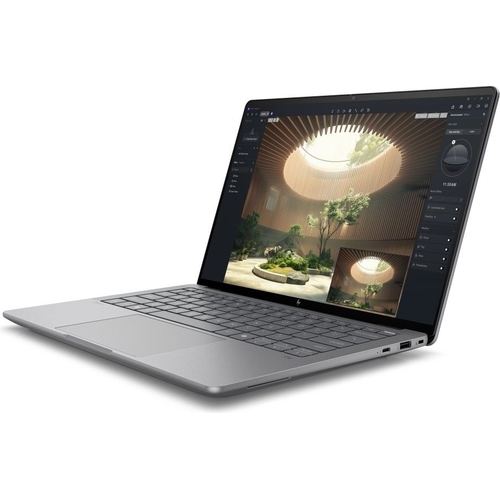
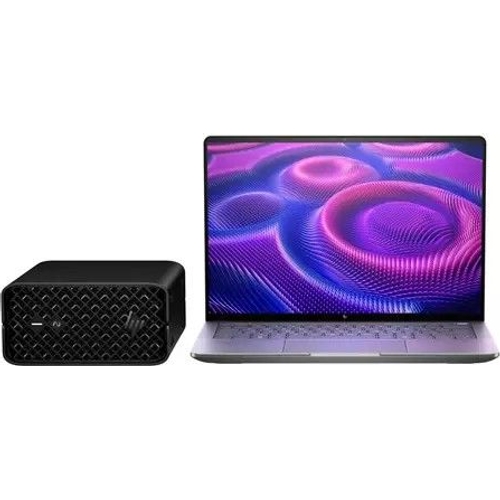
HP ZBook Ultra G1a Copilot+ PC - 14 Inch - AMD Ryzen 3 - 32 GB - 1 TB - Windows - Silver - Wi-Fi 7

Transformative AI performance. Redefining workflows.Unleash groundbreaking performance to take on ...

Best current price£2,351.71from PCHUB.UK

Processor Family
Colour
Screen Size
Resolution

All Offers

6 offers from £2,351.71 - £3,299.97

View price history by clicking the chart icon.

PCHUB.UKHp Silver Zbook Ultra G1a Copilot+ Pc Amd Ryzen Ai Max Pro 390 Mobile Worksta
Free delivery in 1–3 days
£2,351.71
Visit shop
Viking UKHp Zbook Zbultra14 G1a Laptop 35.6 Cm (14 ) 390 32 Gb Amd Radeon 8050S Windows 11 Pro
Free delivery in 1–3 days
£2,668.80
Visit shop
GamingKitHp Silver Zbook Ultra G1a Copilot+ Pc Amd Ryzen Ai Max Pro 390 Mobile Worksta
Free delivery in 1–3 days
£2,822.05
Visit shop
eBayHP ZBook Ultra G1a Copilot+ PC AMD Ryzen AI Max PRO 390 Mobile workstation 35.6
Free delivery in 1–3 days
£2,976.00
Visit shop
Laptops Direct (BID)HPZbook Ultra AMD Ryzen Ai Max+ Pro 32GB RAM 1TB SSD 14 Inch Windows 11 Pro Laptop Silver, Laptops Direct - A3ZH1ET
£6.95 delivery
£3,299.97
Visit shop

Product Information

Full details

The HP ZBook Ultra G1a Copilot+ PC is designed for professionals and creatives who demand groundbreaking AI performance and want to redefine their workflows on the go. This sleek, battery-efficient mobile workstation allows users to simultaneously render and visualize graphic-intensive projects and work with Large Language Models (LLMs) locally. While offering immense power, users should familiarize themselves with its advanced capabilities to fully leverage its transformative performance.

All features

ColourSilver
Resolution2K Ultra HD
RAM32 GB
Processor FamilyAMD Ryzen 3
WiFi StandardWi-Fi 7
Internal Storage Capacity1 TB
Screen Size14
OSWindows
ProcessorAMD Ryzen
SeriesZBook Ultra
Model Part NumberA3ZH1ET
BrandHP

Extended Product Information

FAQs

What kind of AI tasks can this PC handle?

The HP ZBook Ultra G1a is built for complex AI workflows, including local Large Language Model (LLM) processing, acceleration of AI-powered applications, and small-to-medium scale AI model training. Its architecture supports demanding computational tasks common in AI development.

Can I upgrade the RAM or storage in this model?

Specific upgradeability details for RAM (internal memory) and storage (internal storage) vary by model and configuration. Please refer to the official HP ZBook Ultra G1a documentation or contact HP support for precise information regarding user-serviceable components and upgrade options.

What are the key benefits of having Wi-Fi 7?

Wi-Fi 7 offers significant advantages including much faster speeds, lower latency, and greater network capacity compared to previous Wi-Fi standards. This is crucial for high-bandwidth activities like large file transfers, cloud-based AI processing, 4K/8K streaming, and seamless online collaboration, ensuring a future-ready connectivity experience.

Is the 2K Ultra HD display suitable for professional creative work?

Yes, the 14-inch 2K Ultra HD display provides excellent pixel density and clarity, making it highly suitable for professional creative work such as graphic design, video editing, photo retouching, and detailed CAD work where visual accuracy and detail are paramount.

How does this 'mobile workstation' differ from a regular high-end laptop?

A mobile workstation like the HP ZBook Ultra G1a is specifically engineered for professional-grade performance and reliability. It typically features more powerful processors, professional-grade graphics (though not specified here), larger amounts of RAM and storage, and enhanced cooling systems, all designed to handle continuous, demanding tasks like 3D rendering, complex simulations, and advanced AI development, which often push consumer laptops beyond their limits.

What is the expected battery life of the HP ZBook Ultra G1a?

Battery life varies significantly based on usage patterns, the applications running, and power management settings. For intensive tasks such as AI workflows, 3D rendering, or continuous video playback, expect shorter battery life. For general productivity tasks like web browsing and document editing, it will last longer. For specific estimates under various conditions, please consult the official HP specifications or product manual.

Does this PC come with specific software for AI or professional use?

The HP ZBook Ultra G1a runs on Windows, providing compatibility with a wide range of professional software. While it may include some pre-installed HP utilities, specific AI or professional application suites are typically purchased separately or are part of industry-standard installations. Its hardware is optimized to run these demanding applications efficiently.

Troubleshooting

Device won't power on.

Ensure the power adapter is securely connected to both the laptop and a working wall outlet. Try a different outlet or power adapter if available. If running on battery, ensure the battery is charged. Hold the power button down for 15-20 seconds for a hard reset.

Applications or system running slowly/lagging.

Close any unnecessary background applications to free up RAM. Check Task Manager (Ctrl+Shift+Esc) to identify resource-intensive processes. Ensure the device is well-ventilated and not overheating. Check for and install system and driver updates via Windows Update and HP Support Assistant.

Wi-Fi connectivity issues or slow speeds.

Restart your Wi-Fi router and the ZBook Ultra. Ensure your Wi-Fi drivers are up to date. Check Windows network settings to confirm you're connected to the correct network. For optimal Wi-Fi 7 speeds, ensure your router also supports Wi-Fi 7 and you are within its optimal range.

Display issues (flickering, no image, incorrect resolution).

Restart the device. Update your graphics drivers through Windows Update or HP Support Assistant. If using an external monitor, ensure the cable connections are secure and try a different cable or port.

Battery draining quickly.

Adjust power settings in Windows (e.g., 'Balanced' or 'Power Saver' mode). Reduce screen brightness. Close background applications. Disconnect unnecessary peripherals. Monitor battery usage in Windows settings to identify power-hungry apps.

Pros and Cons

Pros

  • Exceptional AI performance for demanding tasks like local LLM processing and complex simulations.
  • Highly portable and battery-efficient design, suitable for professionals on the go.
  • Ample 32 GB RAM and 1 TB storage facilitate handling large projects and numerous applications.
  • High-resolution 14-inch 2K Ultra HD display offers superior visual clarity for creative work.
  • Future-proof Wi-Fi 7 connectivity ensures fast and stable wireless performance.
  • Robust AMD Ryzen 3 processor delivers strong general computing power.

Cons

  • Advanced features may present a learning curve for users new to mobile workstations or complex AI tools.
  • Info needed: Specific battery life expectations under heavy AI or rendering loads.
  • Info needed: Potential for higher heat generation during prolonged peak performance usage.
  • Info needed: Comprehensive list of available ports for specific peripherals.

Setup, Compatibility & Care

Setup

  1. Unboxing and Initial Power-Up: Carefully remove your HP ZBook Ultra G1a from its packaging. Connect the provided power adapter to a wall outlet and then to the laptop. Press the power button, typically located on the keyboard deck, to start the device.
  2. Windows Setup: Follow the on-screen instructions to configure the Windows operating system. This includes selecting your region, keyboard layout, connecting to a network (utilizing Wi-Fi 7 for a quick setup), and creating your user account.
  3. Driver and Software Updates: Once Windows is fully set up, connect to the internet. Access Windows Update and the pre-installed HP Support Assistant application to check for and install all available system updates, drivers, and firmware. This ensures optimal performance, security, and access to the latest features.

Compatibility

  • Operating System: The device runs on Windows, providing broad compatibility with a vast ecosystem of professional software applications and tools.
  • Wireless Connectivity: Featuring Wi-Fi 7, it is backward compatible with Wi-Fi 6E, Wi-Fi 6, and older Wi-Fi standards, ensuring seamless connection to virtually any wireless network.
  • External Devices: Connects to external monitors, peripherals, and storage devices via its standard USB ports. Info needed: Specific types and quantities of USB ports (e.g., USB-C, USB-A, Thunderbolt).

Care

  • Cleaning: To maintain the display, gently wipe it with a clean, dry microfiber cloth specifically designed for electronics. For the chassis, use a soft, damp cloth. Avoid abrasive cleaners or harsh chemicals, which can damage surfaces.
  • Battery Maintenance: Optimize battery longevity by avoiding constant full discharge or continuous charging to 100%. If storing the device for an extended period, ensure it has a partial charge (around 50-70%) and store it in a cool, dry environment.
  • Ventilation: Always ensure that the ventilation slots on the device are clear and unobstructed. Proper airflow is crucial to prevent overheating, especially during demanding tasks like AI model training or high-resolution rendering.
  • Software Maintenance: Regularly perform antivirus scans and keep your operating system, drivers, and all installed applications updated. This helps protect against security vulnerabilities and ensures peak performance.

Similar items

Price History

DatePrice
Visit shop