
Laptop Microsoft - 15" - 1 TB - Silver - Intel Core - Wi-Fi 7 - Windows - Series 7
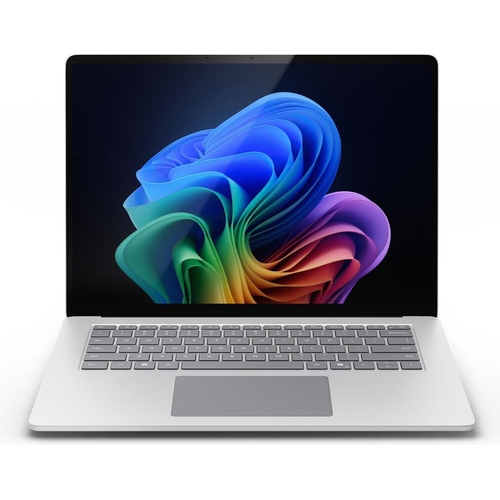
If you are looking for new market trending items, we present the Laptop Microsoft EP2-21517! The M...

Currently unavailable

Processor Family
Colour
Screen Size
Resolution

Currently out of stock

This product is not available at the moment. Check back later.

Product Information

Full details

The Microsoft Surface Laptop 7 for Business is a premium clamshell laptop designed for professionals and students seeking AI-enhanced productivity and mobility. Its key benefit lies in the powerful Intel Core Ultra 7 processor coupled with Copilot+ AI features, delivering swift performance for demanding applications. A potential caveat is its business-centric configuration, which might offer fewer consumer-oriented customization options out-of-the-box. This laptop boasts a 15-inch PixelSense display, 32 GB of LPDDR5x RAM, a 1 TB SSD, Intel Arc Graphics, and Wi-Fi 7 connectivity, all housed in an elegant platinum aluminum chassis running Windows 11 Pro.

All features

ColourSilver
RAM32 GB
WiFi StandardWi-Fi 7
Internal Storage Capacity1 TB
Screen Size15
OSWindows
ProcessorIntel Core
Series7
Model Part NumberEP2-21517
BrandMicrosoft

Extended Product Information

FAQs

What is a Copilot+ PC?

A Copilot+ PC is a new category of Windows PCs designed to deliver advanced AI experiences. They feature specialized NPUs (Neural Processing Units) and are optimized to run AI models locally, enabling features like Recall, Cocreator, and Windows Studio Effects for enhanced productivity and creativity.

What is the main advantage of the Intel Core Ultra 7 processor in this laptop?

The Intel Core Ultra 7 processor includes a dedicated NPU (Neural Processing Unit) that significantly accelerates AI tasks. This allows the laptop to run AI features more efficiently, smoothly, and with lower power consumption compared to traditional processors, enabling powerful AI-driven applications and multitasking.

How does the 120Hz refresh rate on the display benefit users?

A 120Hz refresh rate means the display updates its image 120 times per second, which is twice as fast as a standard 60Hz display. This results in smoother scrolling, more fluid animations, reduced motion blur in videos and games, and an overall more responsive and visually pleasing experience.

Can I charge the laptop using the USB-C port?

Yes, the laptop features USB4 Gen 3x2 ports that support USB Power Delivery (USB PD). You can use a compatible USB-C charger to power and charge the device, in addition to the dedicated Surface Connect port.

What is the difference between the Intel Core Ultra 7 and older Intel Core processors?

The Intel Core Ultra processors, including the Ultra 7 series, feature a new architecture with integrated NPUs for AI acceleration, improved integrated graphics (Intel Arc), and enhanced power efficiency. They are designed to handle modern AI workloads and provide a more capable and efficient computing experience.

Is the laptop suitable for gaming?

While the Intel Arc Graphics 140V offers improved integrated graphics performance compared to previous generations, this laptop is primarily designed for business productivity and AI tasks. It can handle casual gaming and older titles, but it is not optimized for demanding, high-fidelity modern gaming that typically requires a dedicated graphics card.

What is the benefit of Wi-Fi 7 connectivity?

Wi-Fi 7 offers significantly higher potential speeds, lower latency, and improved reliability compared to previous Wi-Fi standards like Wi-Fi 6/6E. This means faster downloads, smoother streaming of high-resolution content, and a more stable connection for demanding online activities and applications.

Troubleshooting

Laptop not turning on

Ensure the AC adapter is securely connected to both the laptop and a working power outlet. Try using a different outlet. If using a USB-C charger, verify it supports Power Delivery (PD) and meets the power requirements. Press and hold the power button for 10-15 seconds to perform a hard reset.

Screen is dim or not displaying correctly

Check the display brightness settings in Windows. Ensure HDR content is enabled if applicable. Restart the laptop. If the issue persists, check for graphics driver updates via Windows Update or Intel's support website.

Wi-Fi or Bluetooth connectivity issues

Toggle Wi-Fi and Bluetooth off and on in Windows settings. Restart the laptop. Ensure you are within range of your Wi-Fi router. Update network drivers through Device Manager or Windows Update. Reset network settings if problems persist.

Slow performance

Close unnecessary applications running in the background. Check Task Manager for resource-hungry processes. Ensure Windows and all drivers are up-to-date. Restart the laptop. Free up disk space if the SSD is nearly full.

Touchscreen is unresponsive

Restart the laptop. Ensure the screen is clean and free of debris. Check for HID-compliant touch screen driver updates in Device Manager. If the issue persists, consider a system restore or contacting support.

Pros and Cons

Pros

  • Exceptional AI-powered performance with Intel Core Ultra 7 processor.
  • Large and vibrant 15-inch PixelSense display with a 120Hz refresh rate.
  • Generous 32 GB RAM and 1 TB SSD for superior multitasking and storage.
  • Latest Wi-Fi 7 and Bluetooth 5.4 connectivity.
  • Premium build quality with an elegant platinum finish.
  • Optimized for business with Windows 11 Pro and security features.

Cons

  • May be priced higher due to premium specifications.
  • Spanish QWERTY keyboard layout might be a consideration for non-Spanish speakers.
  • Discrete graphics card is not included, limiting extremely high-end gaming or specialized graphics work.
  • Proprietary Surface Connect charging port alongside USB-C, requiring specific accessories.
  • Focus on business features might mean fewer consumer-specific pre-installed apps.

Setup, Compatibility & Care Instructions

Initial Setup:

  1. Unboxing: Carefully unpack the laptop and its accessories, including the 65W AC adapter.
  2. Power Up: Connect the AC adapter to the laptop's Surface Connect port or USB Type-C port and plug it into a power outlet.
  3. First Boot: Press the power button to turn on the device. Follow the on-screen prompts to complete the Windows 11 Pro setup, including network connection, Microsoft account sign-in, and privacy settings.
  4. Updates: Once set up, ensure Windows is fully updated by going to Settings > Windows Update and checking for updates. Install all available updates.

Compatibility:

  • Operating System: Designed for Windows 11 Pro (64-bit). Most Windows applications are compatible, but always check specific software requirements.
  • Peripherals: Supports Wi-Fi 7 (802.11be) and Bluetooth 5.4 for wireless devices. Features two USB4 Gen 3x2 ports (supporting DisplayPort Alternate Mode and USB PD) and one USB 3.2 Gen 1 Type-A port for wired peripherals.
  • Accessories: Compatible with Surface Connect accessories and USB-C devices. The included 65W adapter is optimized for this model.
  • Memory Cards: Integrated card reader supports MicroSD, MicroSDHC, and MicroSDXC formats.

Care and Maintenance:

  • Cleaning: Use a soft, lint-free cloth to clean the screen and body. For stubborn marks, slightly dampen the cloth with water or a screen-safe cleaner. Avoid abrasive materials or excessive moisture.
  • Battery Health: To optimize battery life, adjust power settings in Windows and avoid leaving the laptop plugged in at 100% charge for extended periods when not in use.
  • Storage: Keep the laptop in a cool, dry place when not in use. Avoid extreme temperatures.
  • Ventilation: Ensure the laptop's vents are not blocked to prevent overheating during operation. Do not place on soft surfaces like blankets for extended periods while in use.