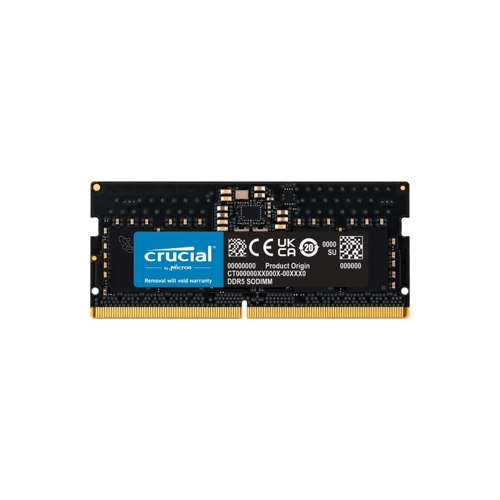
This guide is for laptop users seeking to upgrade their memory with the Crucial 8GB DDR5-5600MHz SODIMM RAM module. It offers a significant boost in speed and multitasking capabilities compared to DDR4, resulting in faster load times and improved responsiveness. Keep in mind that this RAM is only compatible with DDR5-compatible motherboards.
All features
Colour
Black
Model Part Number
CT8G56C46S5
Brand
Crucial
Extended Product Information
FAQs
What is the difference between DDR4 and DDR5 RAM?
DDR5 offers a significant performance increase over DDR4, including faster speeds, higher bandwidth, and improved efficiency. DDR5 also features on-module voltage regulation.
Can I use this RAM in my desktop computer?
No, this is a SODIMM module designed for laptops. Desktop computers use DIMM modules.
How do I know if my laptop is compatible?
Check your laptop's specifications or consult the manufacturer's website to confirm compatibility with DDR5 SODIMM and the 5600MHz speed.
What does 'MHz' mean?
MHz (Megahertz) is a unit of measurement for the memory clock speed, indicating how fast the RAM can transfer data. The higher the MHz, the faster the RAM.
What is ECC?
ECC (Error-Correcting Code) is a type of memory that can detect and correct common types of data corruption.
How much RAM do I really need?
8GB is a good starting point for general use, but for more demanding tasks such as video editing or gaming, 16GB or more is recommended.
How do I install the RAM?
Consult your laptop's manual for specific instructions. Generally, you'll need to open the laptop, locate the RAM slots, and insert the module correctly.
What is the warranty for this RAM?
Crucial provides a limited lifetime warranty for their RAM modules.
Troubleshooting
Laptop fails to boot after installing the RAM.
Ensure the RAM module is correctly seated in the slot. Check the compatibility of the RAM with your laptop model.
Laptop boots, but the system doesn't recognize the RAM.
Try reseating the RAM module. If the issue persists, check your BIOS settings to ensure the RAM is enabled.
System performance is not improved after installation.
Make sure your system is utilizing the new RAM by checking the system information. Confirm that the new RAM is recognized by the operating system.
Pros and Cons
Pros
Significantly faster than DDR4 RAM, leading to improved application loading times.
Improved multitasking capabilities for handling multiple applications simultaneously.
On-module voltage regulation for improved efficiency and stability.
Includes ECC for enhanced data integrity and reliability.
Designed for laptop computers.
Cons
Requires a DDR5-compatible motherboard.
May not be compatible with all laptop models, check compatibility before purchase.
Higher initial cost compared to DDR4.
Limited capacity compared to other available modules.
Setup, Compatibility & Care
Installation: Consult your laptop's manual for instructions on opening the laptop and accessing the RAM slots. Carefully insert the module into the slot, ensuring it is properly aligned and clicks into place.
Compatibility: Confirm that your laptop is compatible with DDR5 SODIMM memory and supports the 5600MHz speed. Check your laptop's specifications or consult the manufacturer's website.
Care: Avoid touching the gold connectors on the module. Handle the module by its edges. Ensure your laptop is turned off and disconnected from the power source before installation or removal. Avoid exposing the RAM to extreme temperatures or humidity.



 Box.co.uk£134.99Visit shop
  Sports Direct UK£329.00Visit shop


