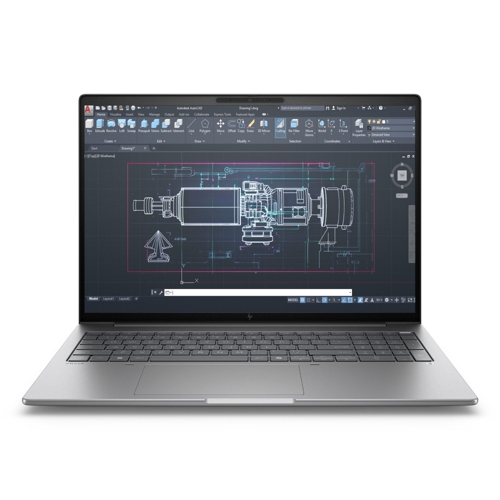
HP ZBook 8 G1i Mobile Workstation PC - 16 inch - Intel Core i7 - 32 GB - 1 TB - Silver - Wi-Fi 7

Step up performance. Not size. Pro-level performance combines with true mobility in this sleek and...

Best current price£2,157.52from PCHUB.UK

Processor Family
Colour
Screen Size
Resolution

All Offers

4 offers from £2,157.52 - £3,352.00

View price history by clicking the chart icon.

PCHUB.UKHp Silver Zbook X G1i Data Science Intel Core Ultra 7 255H Mobile Workstation
Free delivery in 1–3 days
£2,157.52
Visit shop
eBayHP Zbook X G1i 16"" Laptop Intel Ultra 7 32GB RAM 1TB RTX PRO 1000 Windows 11 Pro
Free delivery in 1–3 days
£3,039.99
Visit shop

Product Information

Full details

The HP ZBook 8 G1i is a mobile workstation designed for professionals needing high performance on the go. It provides pro-level performance and long-lasting battery life. However, it's worth noting that this workstation is designed for professional use and may be overkill for basic tasks. Key features include a 16-inch display, Intel Core i7 processor, 32 GB of internal memory, and 1 TB of internal storage, all within a sleek, portable design.

All features

ColourSilver
ResolutionFull HD
RAM32 GB
Processor FamilyIntel Core i7
WiFi StandardWi-Fi 7
Internal Storage Capacity1 TB
Screen Size16
OSWindows
ProcessorIntel Core
SeriesZBook
Model Part NumberB72U6ET
BrandHP

Extended Product Information

FAQs

How do I update the drivers?

Go to the HP support website, enter your product model, and download the latest drivers for your operating system.

What is the warranty period?

The HP ZBook 8 G1i typically comes with a standard limited warranty. Check the documentation that came with your device or visit the HP website for detailed warranty information.

Can I upgrade the RAM?

Yes, the HP ZBook 8 G1i allows for RAM upgrades. Consult the device specifications and user manual for instructions and compatible RAM types.

How do I clean the screen?

Use a soft, microfiber cloth slightly dampened with water. Avoid using harsh chemicals or cleaners.

How do I extend battery life?

Reduce screen brightness, disable unused features like Bluetooth and Wi-Fi, close unnecessary applications, and adjust the power settings to conserve energy.

What operating system does it come with?

The HP ZBook 8 G1i comes with Windows 11 Pro.

What type of storage does it use?

The laptop uses a 1 TB SSD (Solid State Drive) for storage.

Troubleshooting

Laptop won't turn on.

Check the power adapter and ensure it's properly connected. Try a different power outlet. If the issue persists, contact HP support.

Poor performance.

Close unnecessary applications, update drivers, and ensure the system meets the software's minimum requirements. Consider upgrading RAM or storage if needed.

Wi-Fi connection issues.

Ensure Wi-Fi is enabled, check your router, and update Wi-Fi drivers. Consider moving closer to the router or using an Ethernet connection for a more stable connection.

Overheating.

Ensure the vents are clear of obstructions. Use a cooling pad if needed, and reduce the workload on the laptop.

Battery drains quickly.

Reduce screen brightness, close unnecessary applications, and adjust power settings to conserve battery life. Consider replacing the battery if it's old and degraded.

Pros and Cons

Pros

  • High-performance Intel Core i7 processor.
  • Large 32 GB of RAM for multitasking.
  • Fast and reliable Wi-Fi 7 connectivity.
  • Ample storage with a 1 TB SSD.
  • Portable design for on-the-go productivity.
  • Industry-leading security features.

Cons

  • May be expensive for some users.
  • Battery life can vary depending on usage.
  • Can get hot during intensive tasks.
  • The integrated graphics card may not be ideal for extreme gaming.
  • Limited upgrade options after purchase.
  • Full potential may not be realized with basic use.

Setup, Compatibility & Care

Setup

  1. Initial Setup: Upon first boot, follow the on-screen prompts to set up your Windows operating system, including language, region, and network connections.
  2. Driver Updates: Ensure all drivers are up-to-date by visiting the HP support website and downloading the latest drivers for your specific model.
  3. Software Installation: Install the necessary software for your workflow, such as professional design tools, video editing software, or data analysis applications.

Compatibility

The HP ZBook 8 G1i is compatible with a wide range of software and peripherals.

  • Operating System: Windows 11 Pro is pre-installed. Ensure software compatibility with Windows 11.
  • Peripherals: Compatible with external monitors, USB devices, and other accessories. Check device specifications for compatibility.

Care Instructions

  • Cleaning: Use a soft, slightly damp cloth to clean the exterior. Avoid harsh chemicals or abrasive cleaners.
  • Ventilation: Ensure proper ventilation to prevent overheating. Avoid blocking the vents.
  • Battery Care: For optimal battery health, avoid extreme temperatures and fully charging/discharging the battery regularly. It's recommended to let the battery drain to around 20% before recharging.
  • Storage: Store the laptop in a cool, dry place when not in use. Avoid direct sunlight and extreme humidity.

Price History

DatePrice
Visit shop