
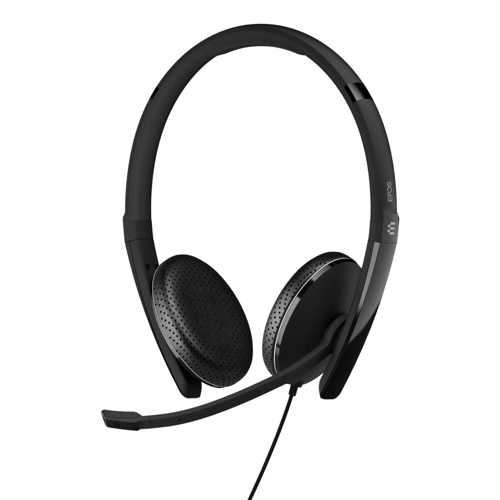
EPOS ADAPT 165 II Wired USB C Stereo Headset - Black


Best current price£54.51from PCHUB.UK
Best offers
Shopping.co.uk recommended and popular offers
 PCHUB.UK£54.51Visit shop
 Epos Adapt 165 Usb-C Ii
Visit shopBest current price£54.51from PCHUB.UK
Shopping.co.uk recommended and popular offers
PCHUB.UK£54.51Visit shop Epos Adapt 165 Usb-C Ii
Visit shop7 offers from £54.51 - £97.35
View price history by clicking the chart icon.


1 offer from £62.50
View price history by clicking the chart icon.
The EPOS ADAPT 165 II is a wired stereo headset designed for professionals in hybrid work environments. Its key benefit is exceptional flexibility, offering both a 3.5mm jack and a detachable USB-C cable for seamless switching between mobile devices and computers. A potential caveat for some users might be the passive noise cancellation, which is effective for reducing ambient noise but not as immersive as active noise cancellation.
| Colour | Black |
|---|---|
| Headphones Noise Cancellation | Passive |
| Series | ADAPT |
| Model Part Number | 1000920 |
| Brand | EPOS |
The 3.5mm jack is a universal analog audio connector suitable for older devices and many mobile phones/tablets. The USB-C connection provides a digital audio connection, often offering higher quality and wider compatibility with modern PCs, laptops, and some mobile devices.
No, the EPOS ADAPT 165 II features *passive* noise cancellation, which is achieved through the design of the earpads and their seal around the ear to block out ambient sound.
While the headset provides clear audio and a good microphone, it is primarily designed for professional communication. Its performance for gaming may vary depending on the game's audio requirements and your specific setup.
Gently wipe the earpads with a soft cloth slightly dampened with water. Avoid using any solvents or harsh cleaning agents.
Yes, the USB-C cable is detachable, allowing you to switch to the 3.5mm jack connection or store the headset more compactly.
EPOS Voice Technology is a proprietary audio technology designed to optimize voice clarity, ensuring natural sound and exceptional speech intelligibility during calls.
Ensure the correct audio device is selected in your operating system and communication application settings. Check that both the USB-C cable and 3.5mm jack are securely connected.
Verify that the microphone is not muted and that it is positioned correctly. Ensure the noise-cancelling microphone is not obstructed. Check microphone settings in your application and operating system.
Try a different USB port or 3.5mm jack on your device. Ensure the cables are not damaged. Restart your computer or mobile device.
Adjust the headband for a snug but not overly tight fit. Ensure the earpads are positioned correctly over your ears. Take breaks during extended use.
Setup:
Compatibility:
Care:
