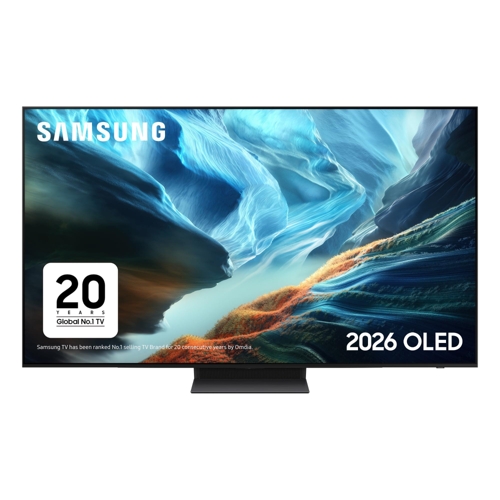
Experience an unparalleled visual journey with Samsung's 77-inch S90H OLED TV. Featuring Glare-Fre...Experience an unparalleled visual journey with Samsung's 77-inch S90H OLED TV. Featuring Glare-Free technology, it delivers true blacks and vibrant, Pantone-validated colors. OLED HDR+ and Auto HDR Remastering Pro enhance brightness and contrast for breathtaking detail. Powered by the NQ4 AI Gen3 Processor, the 4K AI Upscaling Pro optimizes picture and sound for an exceptional viewing experience. The intuitive Tizen OS provides effortless access to your favorite streaming services and the Gaming Hub. Immerse yourself in sound with Object Tracking Sound Lite (OTS Lite) and Dolby Atmos, creating a dynamic 3D audio environment. The elegant LaserSlim Design complements any room. Dominate your games with Motion Xcelerator 165Hz for fluid action and the Ultimate Gaming Pack with FreeSync Premium Pro for tear-free, low-latency HDR gameplay. Connect all your HDMI 2.1 devices with ease. The package includes the 77-inch S90H OLED Smart TV, a power cable, and a user manual. Dimensions: 171.85 x 105.86 x 35.90 cm.
Laptops Direct (BID)Samsung Qe77s90hatxxu 77 Oled 4K Smart Tv S90h Ultra Hd Hdr Tv With Dolby Atmos Ai Upscaling & 165Hz Gaming Black, Laptops Direct - QE77S90HATXXU
The Samsung 77-inch S90H OLED TV is designed for cinephiles and gamers seeking a premium visual experience. Its key benefit is stunning picture quality with true blacks and vibrant, accurate colors, enhanced by advanced HDR and upscaling technologies. A potential caveat is that OLED technology may require specific ambient light considerations for optimal viewing.
All features
Colour
Grey
Screen Size
77
Display Type
4K Ultra HD
Series
S90H
Model Part Number
QE77S90HATXXU
Brand
Samsung
Extended Product Information
FAQs
What is OLED technology and how does it differ?
OLED (Organic Light Emitting Diode) technology uses self-emissive pixels, meaning each pixel produces its own light. This allows for perfect blacks (pixels can turn off completely) and infinite contrast, resulting in exceptional picture quality compared to traditional LED TVs.
Is the Glare-Free technology effective in bright rooms?
Yes, the Glare-Free technology significantly reduces reflections from ambient light sources, making it easier to view content clearly even in well-lit environments.
What are the benefits of the NQ4 AI Gen3 Processor?
The processor uses artificial intelligence to analyze and optimize picture and sound in real-time. It enhances contrast, color, and detail, and upscales lower-resolution content to near-4K quality for a superior viewing experience.
Can I use this TV for gaming?
Absolutely. The S90H features Motion Xcelerator 165Hz and FreeSync Premium Pro, offering a smooth, responsive, and tear-free gaming experience. The Gaming Hub also provides access to cloud gaming services.
What is Object Tracking Sound Lite (OTS Lite)?
OTS Lite uses virtual top speakers to track on-screen objects and create a more immersive 3D audio experience, making the sound appear to come from where the action is happening.
What is the warranty period for this TV?
Please refer to the product documentation or Samsung's official website for the most current warranty information specific to your region, as warranty periods can vary.
How do I connect external devices like a game console?
Connect your game console to one of the TV's HDMI 2.1 ports using an HDMI cable. Ensure the TV is set to the correct HDMI input source. For optimal gaming performance, use the HDMI ports designated for high refresh rates.
Troubleshooting
TV will not turn on
Ensure the power cable is securely connected to both the TV and a working electrical outlet. Check if the remote control has working batteries.
Picture is distorted or has artifacts
Check all cable connections, especially HDMI. Try a different HDMI cable or port. Restart the TV and the connected device.
No sound from the TV speakers
Verify that the TV volume is not muted and is turned up. Check the audio settings and ensure the correct audio output is selected. If using an external sound system, check its connections and settings.
Remote control is unresponsive
Replace the batteries in the remote control. Ensure there are no obstructions between the remote and the TV's sensor. Try re-pairing the remote with the TV through the settings menu.
Wi-Fi connection issues
Restart your router and modem. Ensure the TV is within range of the Wi-Fi signal. Try reconnecting to the network through the TV's network settings.
Pros and Cons
Pros
Exceptional picture quality with perfect blacks and vibrant colors.
Glare-Free technology improves viewing in various lighting conditions.
Advanced AI processing for enhanced picture and sound.
Comprehensive gaming features for a smooth and responsive experience.
Immersive audio with Dolby Atmos support.
Sleek and modern design.
Cons
OLED burn-in is a potential long-term concern with static content.
May not be ideal for extremely bright rooms without managing reflections.
Built-in speakers may not satisfy audiophiles requiring a more robust sound system.
Gaming Hub functionality depends on reliable internet connection and streaming service availability.
Setup, Compatibility & Care
Setup:
Unpack the TV and components carefully.
Attach the stand or mount the TV to a wall using appropriate hardware (not included).
Connect the power cable.
Follow the on-screen prompts to connect to your Wi-Fi network and sign in to your Samsung account.
Scan for channels or connect your external devices (cable box, game consoles, soundbars).
Compatibility:
Supports HDMI 2.1 ports for high-bandwidth connectivity (e.g., 4K@120Hz gaming).
Compatible with major HDR formats including HDR10, HDR10+, and HLG.
Works with Tizen OS for app access and features.
Care:
Clean the screen with a soft, dry microfiber cloth. For stubborn smudges, use a slightly damp cloth (water only) and wipe gently.
Avoid using abrasive cleaners, solvents, or sprays directly on the screen.
Ensure adequate ventilation around the TV to prevent overheating.
To mitigate the risk of OLED burn-in, avoid displaying static images at high brightness for extended periods. Utilize screen saver functions and pixel shift features.


 PCHUB.UK£2,247.08Visit shop
  Hughes£2,999.00Visit shop
  B&Q£2,999.00Visit shop


