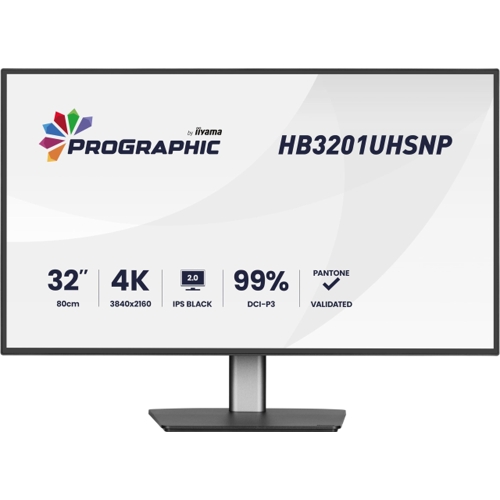
Dell ProGraphic HB3201UHSNP-B1 Monitor - 32 - 4K Ultra HD - Black

Precision meets performance with the 32-inch Dell ProGraphic HB3201UHSNP-B1, a 4K Ultra HD monitor...

Best current price£334.97from Laptops Direct (BID)

Screen Size
Colour
Display Type

All Offers

24 offers from £334.97 - £943.92

View price history by clicking the chart icon.

Laptops Direct (BID)Msi Mag 322Urdf E16 32 Ips Dual Mode 4K UHD 160Hz Full Hd 320Hz 0.5Ms Gaming Monitor Black, Laptops Direct - 9S6-3DD89T-003
£6.95 delivery
£334.97
Visit shop
Scan ComputersMsi 32" Dual Mode 4K/Fhd 160Hz/320Hz Ips Monitor Size 4 Mag 322Urdf E16
Free delivery in 1–3 days
£334.99
Visit shop
AO.comMSI MAG 322URDF E16 31.5 Inch 4K 160Hz Gaming Monitor - Black
Free delivery in 1–3 days
£335.00
Visit shop
PCHUB.UKHp E32k G5 4K Usb-C Monitor
Free delivery in 1–3 days
£371.41
Visit shop
GamingKitHp E32k G5 4K Usb-C Monitor
Free delivery in 1–3 days
£445.69
Visit shop

Refurbished Offers

4 offers from £309.00 - £803.99

View price history by clicking the chart icon.

Box.co.ukMsi Size 32 Black Refurbished - Mag 322Urdf E16 32" Ips Dual Frame Uhd 4K 160Hz 0.5Ms Height Adjustable Gaming Monitor
Free delivery in 1–3 days
£309.00
Visit shop
Laptop OutletMsi Black Refurbished Mag 322Urdf E16 32" 160Hz 4K Ultra Hd 0.5Ms Ips Height Adjustable Gaming Monitor
Free delivery in 1–3 days
£309.00
Visit shop
eBay31.5"" MSI MAG 322URDF E16 4K 160Hz / FHD 320Hz Dual Mode IPS Gaming Monitor
Free delivery in 1–3 days
£325.00
Visit shop
Scan ComputersMsi Open Box 32" 4K 240Hz Adaptive Sync Displayh Size 32 Mpg 322Ur Qd-Oled X24
Free delivery in 1–3 days
£803.99
Visit shop

Used Offer

1 offer from £800.00

View price history by clicking the chart icon.

eBay32"" MSI MPG 322UR QD-OLED X24 Monitor, Tandem OLED, 3840 x 2160, 240Hz, Adaptive
Free delivery in 1–3 days
£800.00
Visit shop

Product Information

Full details

The Dell ProGraphic HB3201UHSNP-B1 is a 32-inch 4K UHD monitor specifically engineered for designers, photographers, and creative professionals who require high color accuracy and deep contrast. Featuring IPS Black 2.0 technology and 99% DCI-P3 coverage, it provides a professional-grade canvas for detail-oriented tasks, though its 60Hz refresh rate means it is better suited for workstation productivity rather than competitive high-speed gaming.

All features

ColourBlack
Screen Size32
Display Type4K Ultra HD
SeriesProGraphic
Model Part NumberHB3201UHSNP-B1
BrandDell

Extended Product Information

FAQs

Does this monitor support gaming?

While it is a 4K monitor, it is limited to 60Hz and has a 4ms response time, making it excellent for casual gaming but not for professional esports.

Can I mount this monitor on a wall?

Yes, it supports a 100x100 mm VESA mount pattern.

What is the benefit of Pantone Validation?

It guarantees that the monitor can accurately reproduce colors from the Pantone Matching System, essential for print and design work.

Does the monitor include speakers?

Yes, it has built-in speakers with 5W RMS power.

What color space does it cover?

It provides 99% coverage of the DCI-P3 color space and 100% of the sRGB space.

Troubleshooting

Monitor not charging laptop via USB-C

Ensure you are using the USB-C cable provided with the monitor and that the laptop's USB-C port supports Power Delivery.

KVM switch not detecting peripherals

Confirm that the USB upstream cable is connected to both host computers and check that the correct input is selected in the OSD menu.

Image flickering or intermittent signal

Ensure all cables are securely seated and try using a certified high-speed HDMI or DisplayPort cable.

Pros and Cons

Pros

  • Stunning 4K resolution with 99% DCI-P3 color coverage
  • Professional-grade Pantone validated color accuracy
  • Convenient 96W USB-C power delivery for laptop charging
  • Excellent contrast performance due to IPS Black 2.0
  • Highly adjustable ergonomic stand

Cons

  • 60Hz refresh rate is not ideal for high-speed gaming
  • Large footprint may require significant desk space
  • Lacks a built-in webcam

Setup, Compatibility & Care

Setting up the monitor is straightforward; simply attach the monitor to the stand base using the provided mounting points. For optimal performance, use the included USB-C cable for a one-cable solution with compatible laptops.

  • Connectivity: Ensure your computer supports DisplayPort Alt Mode over USB-C to utilize the dock features.
  • VESA Mounting: The monitor supports 100 x 100 mm VESA mounts if you wish to attach it to a monitor arm.
  • Care: Use only a clean, dry microfiber cloth to wipe the screen. Avoid harsh chemicals or paper towels, which can damage the specialized anti-glare coating. Keep the ventilation ports clear of obstruction to ensure proper airflow for the internal power supply.

Price History

DatePrice
Visit shop