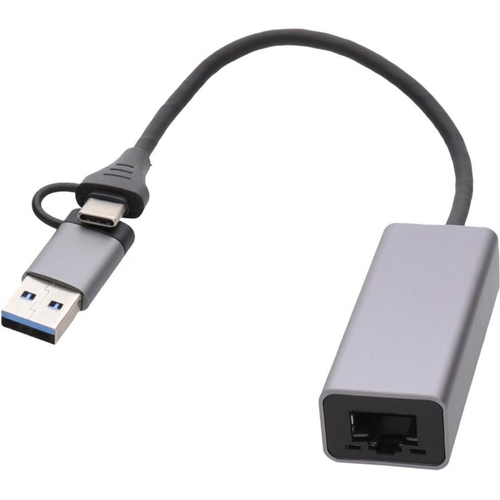
Kenable Usb 3.1 Type C And Usb 3.0 A To Rj45 Gigabit Ethernet Network Socket - Black
The Gigabit USB 3.0 Ethernet adapter converts a USB A or USB Type C port into a 10/100/1000 Base-T...The Gigabit USB 3.0 Ethernet adapter converts a USB A or USB Type C port into a 10/100/1000 Base-T Ethernet RJ45 port. It enables a low-cost Gigabit Ethernet network connection to any PC, laptop, or embedded system using your existing USB ports. This adapter is perfect for laptops, PCs, and MacBooks that lack an Ethernet port or need to replace a damaged one. It features plug-and-play functionality, supports 10/100/1000 speeds, and uses a USB 3.0 interface. It is compatible with both USB A and USB Type C ports, as well as USB 2.0. The adapter also includes a Wake on LAN function. The cable length is 15cm, and it supports Windows XP, Win 7, Win 8, Win 10, Win 11, MAC, and Linux operating systems.
This Kenable Gigabit Ethernet adapter is for users needing a reliable wired network connection on devices lacking an Ethernet port or with a damaged one. Its key benefit is providing a fast, stable 10/100/1000 Mbps connection via USB 3.0 or USB-C. A minor consideration is its short 15cm cable length.
All features
Colour
Black
Model Part Number
012276
Brand
kenable
Extended Product Information
FAQs
Do I need to install drivers manually?
For most modern operating systems (Windows 7+, macOS, Linux), the adapter is plug-and-play and drivers install automatically. If automatic installation fails, check the manufacturer's website for driver downloads.
Can this adapter be used with a USB 2.0 port?
Yes, the adapter is backward compatible with USB 2.0 ports, but its speed will be limited to the maximum speed of USB 2.0 (480 Mbps), not the full Gigabit speed.
What is the maximum speed this adapter supports?
The adapter supports up to 10/100/1000 Mbps (Gigabit Ethernet) when connected to a USB 3.0 or higher port and a compatible network.
How long is the cable?
The integrated cable has a length of 15cm.
Can I use this with my MacBook?
Yes, this adapter is compatible with MacBooks running macOS, provided they have a USB-A or USB-C port.
Does this adapter work with Android devices?
Compatibility with Android devices depends on the specific device and its support for USB Ethernet adapters via OTG (On-The-Go). It is not guaranteed for all Android devices.
Is this adapter powered by the USB port?
Yes, the adapter is powered directly from the USB port it is connected to, so no external power adapter is required.
Troubleshooting
Adapter not recognized by the computer
Ensure the adapter is securely plugged into a USB 3.0 or higher port. Try a different USB port. Restart your computer. Verify driver installation if prompted.
No internet connection after installation
Check that the Ethernet cable is properly connected at both ends (adapter and router/switch). Ensure the network cable is functional. Verify that the adapter is enabled in your system's network settings.
Slow network speeds
Confirm you are using a USB 3.0 or higher port. Ensure the Ethernet cable is Cat5e or higher. Check that your router/switch ports are Gigabit capable. Test speed with a known good network connection.
Wake on LAN not working
Verify that Wake on LAN is enabled in your computer's BIOS/UEFI settings and in the adapter's driver properties within the Device Manager. Ensure the adapter is connected to a powered USB port.
Pros and Cons
Pros
Adds reliable wired Ethernet to laptops and PCs.
Supports high Gigabit speeds for faster data transfer.
Compatible with both USB-A and USB-C ports.
Easy plug-and-play installation across multiple operating systems.
Includes convenient Wake on LAN feature.
Cons
The 15cm cable may be too short for some desktop setups.
Requires an available USB 3.0 or higher port for optimal performance.
Does not add Wi-Fi capabilities.
Setup, Compatibility & Care
Setup:
Plug the adapter into an available USB 3.0 (or USB-C) port on your computer.
The operating system should automatically detect the adapter and install the necessary drivers.
Connect an Ethernet cable from your router or network switch to the adapter's RJ45 port.
Your device should now have a wired network connection.
Compatibility:
Operating Systems: Windows XP, Windows 7, Windows 8, Windows 10, Windows 11, macOS, Linux.
USB Ports: USB 3.0, USB 3.1, USB Type-C (with included adapter or direct connection).
Backward Compatibility: Works with USB 2.0 ports, but performance will be limited to USB 2.0 speeds (max 480 Mbps).
Care:
Keep the adapter dry and away from extreme temperatures.
Clean the exterior with a dry, soft cloth. Avoid using liquids or abrasive cleaners.
Ensure the USB port and connector are free from dust and debris.

 eBay£12.99Visit shop
  B&Q£14.35Visit shop