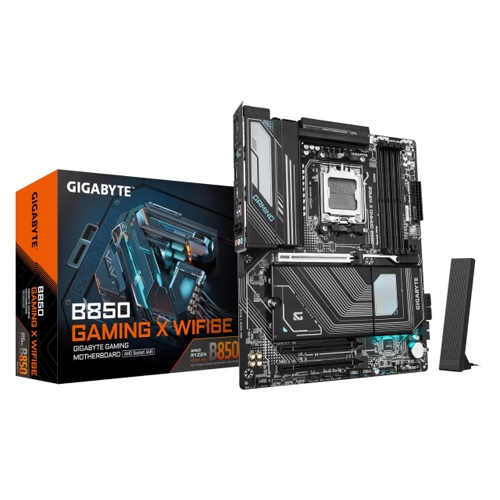
Gigabyte B850 GAMING X WIFI6E Motherboard - B850 GAMING X WIFI6E

Unleash your gaming potential with the Gigabyte B850 GAMING X WIFI6E motherboard designed for AMD ...

Best current price£84.09from PCHUB.UK

All Offers

100 offers from £84.09 - £359.99

View price history by clicking the chart icon.

PCHUB.UKGigabyte B650m S2h Motherboard - Amd Ryzen 9000 Series Cpus. 5+2+2 Pha
Free delivery in 1–3 days
£84.09
Visit shop
AWD-IT.co.ukGigabyte B650m S2h Amd B650 Chipset, Am5, Ddr5, Micro Atx Motherboard
Free delivery in 1–3 days
£86.80
Visit shop
GamingKitGigabyte B650m S2h Motherboard - Amd Ryzen 9000 Series Cpus. 5+2+2 Pha
Free delivery in 1–3 days
£100.91
Visit shop
eBayGigabyte B650M S2H Socket Am5/B650/Ddr5/S-Ata 6Gb/S/Micro Atx
Free delivery in 1–3 days
£101.45
Visit shop
CurrysGigabyte B650m D3hp Ax Am5 Motherboard, Black
Free delivery in 1–3 days
£113.99
Visit shop

Refurbished Offers

4 offers from £99.99 - £169.99

View price history by clicking the chart icon.

eBayGIGABYTE AMD B650 Socket AM5 ATX Motherboard DDR5 PCIe 5.0 M.2 Wi-Fi 6E 2.5GbE
Free delivery in 1–3 days
£99.99
Visit shop
Scan ComputersGigabyte Amd Am5 Ddr5 Refurbished Motherboard B650 Eagle Ax
£11.50 delivery
£124.99
Visit shop

Used Offers

10 offers from £94.99 - £129.96

View price history by clicking the chart icon.

eBayGigabyte B650 Eagle AX AM5 ATX Motherboard DDR5, Ryzen 9000 Series Ready
Free delivery in 1–3 days
£94.99
Visit shop

Product Information

Full details

The Gigabyte B850 GAMING X WIFI6E motherboard is designed for serious gamers and creative professionals seeking to maximize performance with AMD Ryzen AM5 processors. It delivers cutting-edge features like DDR5 memory, PCIe 5.0 support, and WiFi 6E connectivity, ensuring a robust and future-proof foundation for your build. While offering exceptional speed and user-friendly installation, it's optimized for the latest AMD platforms and Windows 11, which might entail a higher initial system investment.

All features

Model Part NumberB850 GAMING X WIFI6E
BrandGigabyte

Extended Product Information

FAQs

What AMD processors are compatible with this motherboard?

The Gigabyte B850 GAMING X WIFI6E motherboard supports AMD Ryzen 7000, 8000, and 9000 Series Processors that use the AM5 socket.

What type of RAM does this motherboard use, and what are its capabilities?

It uses DDR5 RAM and supports overclocked speeds up to 8200MT/s across four DIMM slots. It also features AMD EXPO™ memory module support for easy performance optimization.

Does this motherboard support PCIe 5.0?

Yes, it supports PCIe 5.0. It has a dedicated PCIe 5.0x4 M.2 slot for ultra-fast NVMe SSDs and also supports PCIe 5.0 for graphics cards.

How do the EZ-Latch features work?

EZ-Latch features simplify installation. PCIe EZ-Latch Plus allows for tool-less graphics card removal, M.2 EZ-Latch Plus enables tool-less M.2 SSD installation, and M.2 EZ-Latch Click provides a screwless design for M.2 heatsinks.

What is X3D Turbo Mode and how do I use it?

X3D Turbo Mode is a BIOS innovation that, with one-click activation, optimizes Ryzen 9000 non-X3D processors to achieve gaming performance levels similar to X3D counterparts. You can enable it through the motherboard's BIOS settings.

What operating system is recommended for this motherboard?

Gigabyte recommends installing Windows 11 (64-bit) to take full advantage of all the features and optimizations offered by this motherboard.

How many M.2 slots does this motherboard have?

The motherboard is equipped with three M.2 slots for high-speed storage, including one that supports PCIe 5.0x4.

How can I update the BIOS on this motherboard?

You can update the BIOS using the Q-Flash Auto Scan feature within the BIOS, which allows for convenient and secure firmware updates.

Troubleshooting

System will not boot after assembly or upgrade.
  1. Double-check all power connections to the motherboard (24-pin ATX, 8-pin CPU) and graphics card. 2. Reseat RAM modules firmly in their slots. 3. Ensure the CPU is correctly seated. 4. Clear the CMOS by removing the battery for 30 seconds or using the dedicated jumper/button, then try again.
Poor or unstable Wi-Fi connection.
  1. Ensure the WIFI EZ-Plug antenna is securely connected to the motherboard's rear I/O ports. 2. Verify the antenna is positioned upright and unobstructed. 3. Update the Wi-Fi drivers to the latest version from the Gigabyte website. 4. Check for potential interference from other wireless devices.
M.2 SSD is not detected in BIOS or Windows.
  1. Confirm the M.2 SSD is fully seated in its slot using the EZ-Latch Plus mechanism. 2. Check the BIOS settings to ensure the M.2 slot is enabled and configured correctly (e.g., NVMe mode). 3. Ensure your operating system is properly installed and formatted to recognize NVMe drives. 4. Try the SSD in a different M.2 slot if available.
X3D Turbo Mode or AORUS AI Snatch features are not active or providing expected performance.
  1. Ensure you have updated your motherboard BIOS to the latest version available on the Gigabyte support website. These features often require the most recent firmware. 2. Access the BIOS and verify that X3D Turbo Mode or AORUS AI Snatch are enabled in the appropriate settings menus. 3. For X3D Turbo Mode, ensure you are using a compatible AMD Ryzen 9000 (non-X3D) processor.
System crashes or experiences instability during demanding tasks.
  1. Verify your power supply unit (PSU) has sufficient wattage for all your components. 2. Monitor CPU and GPU temperatures using Gigabyte Control Center or other monitoring software to check for overheating. 3. Ensure proper case airflow and cooling fan configuration. 4. Run memory diagnostic tools to check for RAM stability issues. 5. Update all drivers (chipset, graphics, etc.) to the latest versions.

Pros and Cons

Pros

  • Supports the latest AMD Ryzen AM5 processors (7000, 8000, 9000 Series) for cutting-edge performance.
  • High-speed DDR5 memory support with overclocking capabilities up to 8200MT/s and AMD EXPO.
  • Advanced networking with WiFi 6E and 2.5GbE LAN for superior online experiences.
  • User-friendly EZ-Latch designs simplify the installation of critical components like GPUs and M.2 SSDs.
  • Integrated performance optimization features such as X3D Turbo Mode and AORUS AI Snatch enhance gaming and overall system responsiveness.
  • Robust digital power delivery (VRM) and advanced thermal solutions ensure stability and durability under heavy workloads.

Cons

  • Requires an AMD Ryzen AM5 processor, which may represent a higher entry cost for new builds.
  • Optimal feature utilization and performance are achieved with Windows 11 (64-bit).
  • May be considered overkill for users with basic computing needs or those not planning to game or perform intensive tasks.
  • While supporting multiple M.2 slots, only one is explicitly stated to be PCIe 5.0x4, with others likely being PCIe 4.0 or lower.
  • Info needed: No specific information on number of SATA ports was provided, which might be a limitation for users with many traditional drives.

Setup, Compatibility & Care

Getting your Gigabyte B850 GAMING X WIFI6E motherboard up and running is streamlined with user-friendly features, but it's important to understand compatibility and proper care for longevity.

Setup Instructions

  1. CPU Installation: Carefully install your AMD Ryzen AM5 processor (7000, 8000, or 9000 series) into the AM5 socket, ensuring correct orientation. Refer to your CPU's manual for specific installation steps.
  2. RAM Installation: Install your DDR5 memory modules into the four DIMM slots. For optimal performance, populate slots according to the dual-channel configuration recommended in the motherboard's manual.
  3. Graphics Card: Utilize the PCIe EZ-Latch Plus to easily install your graphics card. Simply align the card and push it into the slot until the latch clicks, then secure it with a screw to your case if needed.
  4. M.2 SSD Installation: Use the M.2 EZ-Latch Plus for tool-less installation of M.2 NVMe SSDs. Insert the SSD into the slot, then secure it with the latch mechanism. For M.2 heatsinks, the M.2 EZ-Latch Click allows for screwless attachment.
  5. Wi-Fi Antenna: Connect the included WIFI EZ-Plug antenna to the rear I/O panel for Wi-Fi 6E connectivity. Position the antenna for optimal signal reception.
  6. Operating System: For full feature utilization, Gigabyte recommends installing Windows 11 (64-bit).
  7. BIOS Configuration: After initial boot, access the BIOS (typically by pressing `DEL` during startup) to enable features like X3D Turbo Mode and AORUS AI Snatch, or update the BIOS using Q-Flash Auto Scan.

Compatibility

  • Processors: Supports AMD Ryzen 7000, 8000, and 9000 Series Processors using the AM5 socket.
  • Memory: Compatible with DDR5 RAM modules, with support for speeds up to 8200MT/s (OC). Ensure memory kits are on the motherboard's Qualified Vendor List (QVL) for best compatibility.
  • Graphics: Supports PCIe 5.0 and earlier generation graphics cards.
  • Storage: Compatible with M.2 NVMe SSDs (PCIe Gen5 and Gen4), as well as traditional SATA drives.
  • Operating System: Fully compatible with Windows 11 (64-bit). Ensure all necessary drivers are installed.

Care & Maintenance

  • Dust Control: Regularly clean your PC case and motherboard to prevent dust buildup, which can impede airflow and lead to overheating. Use compressed air to gently remove dust from heatsinks and fans.
  • BIOS Updates: Keep your BIOS updated to the latest version. This can improve system stability, enhance performance, and add support for new hardware. Use the Q-Flash utility for safe updates.
  • Driver Management: Install and regularly update drivers for all components, especially chipset, graphics, and network drivers, to ensure optimal performance and security.
  • Software Monitoring: Utilize the Gigabyte Control Center to monitor system temperatures, fan speeds, and voltages. This helps in proactive maintenance and ensures components are running within safe operating parameters. It also allows for RGB FUSION customization and AIO Fan Control.

Similar items

Price History

DatePrice
Visit shop