Asus Zenbook S 16 - 16 inch - AMD Ryzen 9 - 16 GB - 1 TB - White

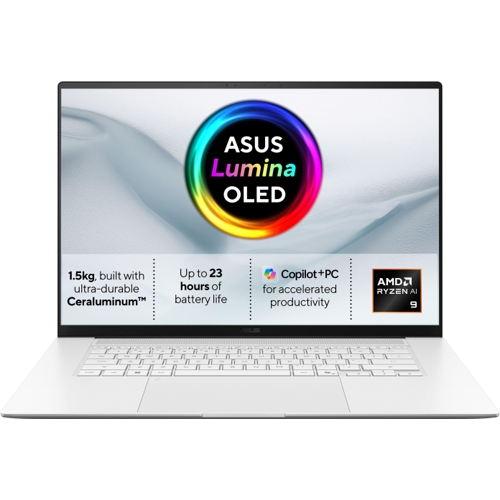
The ASUS Zenbook S16 features a slim 1.1-centimetre profile crafted from solid metal using a singl...

Best current price£1,799.99from Scan Computers

All Offers

5 offers from £1,799.99 - £1,999.00

View price history by clicking the chart icon.

Scan ComputersAsus Zenbook Um5606ga 16" 3K 120Hz Amd Ryzen Ai 9 Radeon Graphics Size 16 Um5606ga-Sr536w
£11.50 delivery
£1,799.99
Visit shop
AO.comAsus Zenbook S 16 OLED Laptop with AMD Ryzen AI 9, 16GB RAM, 1TB SSD, 16-inch 3K Display, White
Free delivery in 1–3 days
£1,849.00
Visit shop
eBay16"" ASUS Zenbook S 16 UM5606GA, OLED, 3K, AMD Ryzen AI 9 465, 16GB LPDDR5X, 1TB
Free delivery in 1–3 days
£1,935.36
Visit shop
very.co.ukAsus Zenbook S16 16In 3K 2880 X 1800 Laptop
£3.99 delivery
£1,999.00
Visit shop

Product Information

Full details

The ASUS Zenbook S 16 is a high-performance, ultra-slim laptop designed for professionals and creatives who prioritize both mobility and power. Featuring an AMD Ryzen AI 9 processor, a stunning 3K OLED touchscreen, and a durable Ceraluminum chassis, it excels at multitasking and AI-driven workflows. One caveat is that the 16GB of internal memory is on-board, meaning it cannot be upgraded or expanded by the user after purchase.

All features

ColourWhite
RAM16 GB
Processor FamilyAMD Ryzen 9
Internal Storage Capacity1 TB
Screen Size16
OSWindows
ProcessorAMD Ryzen
SeriesZenbook S 16
Model Part NumberUM5606GA-SR536W
BrandAsus

Extended Product Information

FAQs

Can I upgrade the RAM in the ASUS Zenbook S 16?

No, the 16GB of LPDDR5x RAM is integrated on-board and cannot be upgraded or replaced.

Does the laptop support fast charging?

Yes, the device supports USB-C Power Delivery and can be charged using a compatible 100W USB-C charger.

Is the Zenbook S 16 good for gaming?

It is capable of handling light to moderate gaming thanks to the AMD Radeon 880M graphics, but it is primarily designed for productivity and creative workflows.

What is Ceraluminum?

Ceraluminum is a premium, high-tech material used for the display back cover that combines the strength of ceramic with the aesthetics of aluminum, providing increased scratch and shock resistance.

How do I use the Copilot AI features?

You can access Copilot by pressing the dedicated Copilot key on your keyboard or by clicking the Copilot icon in the Windows taskbar.

Does this model come with an SD card slot?

Yes, it features an integrated SD card reader for convenient file transfers.

Troubleshooting

Laptop fails to power on

Ensure the AC adapter is securely connected to a known working outlet and verify the power cable is firmly inserted into the laptop's charging port.

Wi-Fi connection is unstable

Check for available driver updates within the MyASUS app or Windows Update settings, and ensure your router supports Wi-Fi 7 or is backward compatible.

Touchpad gestures are not responding

Restart the device to refresh drivers, and ensure that 'ASUS Smart Gestures' are enabled in the Windows settings menu.

Pros and Cons

Pros

  • Extremely thin and lightweight portable form factor
  • Stunning 3K OLED touchscreen with 120Hz refresh rate
  • Sophisticated Ceraluminum material is scratch and wear-resistant
  • Excellent thermal cooling system ensures quiet operation
  • Equipped with modern Wi-Fi 7 and Bluetooth 5.4

Cons

  • Memory is fixed (on-board) and cannot be upgraded
  • Requires an external AC adapter for charging
  • Not intended for heavy-duty dedicated gaming graphics

Setup, Compatibility & Care

Initial setup is streamlined via Windows 11 Home; follow the on-screen prompts to register your device and sign in with your Microsoft account to enable Windows Hello facial recognition. To maintain the Ceraluminum exterior, simply wipe down the surface with a soft, slightly damp cloth to remove fingerprints or spills, as the material is designed to be stain-resistant. Ensure the device stays updated through the `MyASUS` app to optimize battery health and system performance. When using external displays, the USB Type-C ports support DisplayPort Alternate Mode, allowing for a clean, single-cable connection to compatible monitors.

Similar items

Price History

DatePrice
Visit shop