
Kenable Cable Lead - RJ11 Male Plug to RJ45 Male Plug - 1m
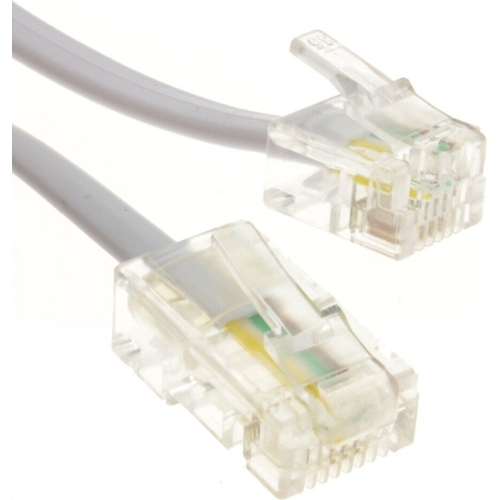
These designed for connecting ADSL modems or routers to ADSL filtered faceplates or sending phone ...

Best current price£2.71from OnBuy.com

All Offers

3 offers from £2.71 - £4.58

View price history by clicking the chart icon.

OnBuy.comRj11 Male Plug To 4 Wire Rj45 Male Plug Flat Cable Lead 1M White 5055383471522
Free delivery in 1–3 days
£2.71
Visit shop
B&QB&Q - Rj11 Male Plug To 4 Wire Rj45 Male Plug Flat Cable Lead 1M White
Free delivery in 1–3 days
£4.58
Visit shop

Product Information

Full details

This Kenable 007152 telephone cable is designed for users needing to connect ADSL modems or routers to filtered faceplates, or for routing phone lines through dedicated LAN cables. Its primary benefit is providing a reliable wired connection for broadband internet. A potential caveat is its specific RJ11 to RJ45 straight-through wiring, which may not be suitable for all network configurations.

All features

Model Part Number007152
Brandkenable

Extended Product Information

FAQs

What is the main purpose of this cable?

This cable is designed to connect ADSL modems or routers to ADSL filtered faceplates, or to send phone lines through dedicated LAN cables for broadband internet.

Can I use this cable for my home Ethernet network?

No, this cable is specifically wired for ADSL phone line connections (RJ11 to RJ45 straight-through). It is not compatible with standard Ethernet networking and will not work for connecting devices like computers or gaming consoles to your router.

What does 'wired straight through' mean for this cable?

'Wired straight through' indicates that the pin connections on the RJ11 connector directly correspond to specific pins on the RJ45 connector, which is the standard configuration for ADSL modems to connect to phone lines via an Ethernet-style socket.

What is the length of the cable?

The cable length is 1 meter.

What type of connectors does this cable have?

It has an RJ11 male plug on one end and an RJ45 male plug on the other end.

Is this cable suitable for VDSL or Fiber connections?

This cable is specifically designed for ADSL connections. VDSL and Fiber connections often use different types of modems and cabling infrastructure.

How should I care for this cable?

Avoid sharp bends, keep connectors clean, and protect it from moisture and extreme temperatures for optimal performance and longevity.

Troubleshooting

No ADSL connection after setup

Ensure the RJ45 connector is plugged into the correct port on the faceplate (if it has multiple ports) and that the faceplate is correctly installed and filtered for ADSL. Verify that the RJ11 is securely connected to the modem/router.

Intermittent connection or slow speeds

Check for any damage to the cable, especially near the connectors. Ensure the cable is not routed near sources of strong electrical interference. Try a different cable to rule out a faulty lead.

Cable does not fit into a standard Ethernet port

This cable uses an RJ45 connector but is wired specifically for ADSL phone line connections. It is not a standard Ethernet cable and will not function for typical network tasks. Ensure you are connecting it to the intended ADSL faceplate or port.

Pros and Cons

Pros

  • Reliable wired connection for ADSL broadband.
  • Convenient 1-meter length for most standard setups.
  • Flat design aids in neat cable management.
  • Specifically designed for ADSL modem/router to faceplate connections.

Cons

  • RJ11 to RJ45 straight-through wiring is specific and not universally compatible with all network devices.
  • May not be suitable for standard Ethernet networking due to specific ADSL wiring.
  • Limited length (1 meter) may be insufficient for longer cable runs.
  • Flat cable can sometimes be less durable than round cables under significant stress.

Setup, Compatibility & Care

Setup:

  1. Identify the RJ11 port on your ADSL modem or router.
  2. Identify the RJ45 port on your ADSL filtered faceplate or network wall plate intended for phone line connection.
  3. Connect the RJ11 plug to the modem/router.
  4. Connect the RJ45 plug to the designated port on the faceplate/wall plate.

Compatibility:

  • Primarily compatible with ADSL modems and routers that utilize an RJ11 port for their main line connection.
  • Designed for use with ADSL filtered faceplates or specific network wall plates that accept an RJ45 connector wired for phone line/ADSL use.
  • *Not* intended for standard Ethernet networking (e.g., connecting a computer to a router) as the wiring is straight-through for ADSL, not standard Ethernet pinouts.

Care:

  • Avoid sharp bends or kinks in the flat cable.
  • Keep connectors clean and free from dust.
  • Do not expose to excessive moisture or extreme temperatures.
  • Gently unplug by pulling the connector, not the cable.

Price History

DatePrice
Visit shop