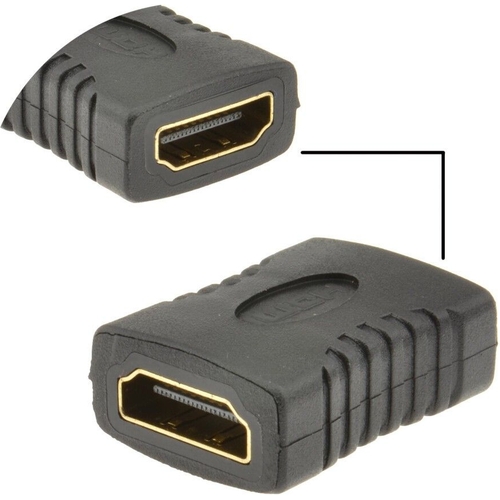
HDMI Coupler Joiner Female to Female. This adapter allows you to join two HDMI cables together or ...HDMI Coupler Joiner Female to Female. This adapter allows you to join two HDMI cables together or convert a male HDMI connector into a female connector. It features an HDMI socket to HDMI socket connection and comes in black.
This guide is for anyone looking to extend their HDMI cables or convert male connectors to female. The kenable HDMI Coupler Joiner allows you to easily connect two HDMI cables. A potential downside is that it may not support very long cable runs due to signal loss over distance.
All features
Colour
Black
Model Part Number
001412
Brand
kenable
Extended Product Information
FAQs
What is the primary function of this HDMI coupler?
The primary function is to connect two HDMI cables together or to convert a male HDMI connector to a female connector.
Does this coupler support 4K resolution?
The coupler itself does not have a resolution limitation, but the combined capabilities of the connected HDMI cables will determine the maximum resolution supported. Ensure that both HDMI cables support the resolution you desire.
Is this coupler compatible with all HDMI versions?
Yes, it is compatible with all standard HDMI versions, but the features available will depend on the HDMI version of the cables and devices connected.
Can I use this coupler to split the HDMI signal?
No, this coupler is designed to join two HDMI cables together. It does not split the signal to multiple displays.
What is the maximum cable length I can use with this coupler?
There is no strict maximum, but signal quality can degrade over long distances. The combined length of the connected HDMI cables should be kept to a reasonable length. The quality of the HDMI cables being connected is also a factor.
Does this coupler require any drivers or software?
No, it is a plug-and-play device and does not require any drivers or software installation.
What is the product color?
The product color is Black.
What is included in the package?
The package includes one HDMI Coupler Joiner Female to Female.
Troubleshooting
No signal or intermittent signal.
Check that the HDMI cables are securely connected to the coupler and the devices. Try different HDMI cables, and ensure both cables are HDMI compliant.
Ensure the HDMI cables are of good quality. Shorten the overall cable length if possible. The combined length of the connected cables may be too long for the signal to travel effectively.
Audio issues.
Make sure that the audio settings on your source device and display are correctly configured. Verify that the HDMI cables support the audio format being used.
Coupler does not fit.
Ensure that the connectors are the correct type (HDMI A). Check that there are no obstructions in the port on either the source or display devices that might be interfering.
Pros and Cons
Pros
Simple solution for extending HDMI cable runs.
Cost-effective alternative to buying longer HDMI cables.
Easy to use; plug-and-play functionality.
Compact and portable design.
Provides a secure and reliable connection.
Works with a variety of HDMI devices.
Cons
May not support very long cable runs.
Signal degradation can occur with longer cable lengths.
Does not refresh or upscale video/audio.
Performance may be affected by the quality of the HDMI cables used.
Limited to joining two cables; not suitable for splitting signals.
Setup, Compatibility & Care
Setup
Identify the HDMI cables you wish to connect.
Plug the male ends of the HDMI cables into each side of the coupler.
Ensure the connections are secure.
Test the connection by playing content on your devices.
Compatibility
Compatible with all standard HDMI cables and devices.
Supports resolutions up to the capabilities of the connected cables.
Check the HDMI version of your cables to ensure compatibility.
Care
Handle the coupler with care to avoid damaging the connectors.
Avoid bending the HDMI cables sharply near the coupler.
Do not expose the coupler to extreme temperatures or moisture.

 OnBuy.com£2.55Visit shop