Kenable Usb 3.0 Ultra Slim 4 Port Hub - Type C To 1 Usb 3.0 + 3 X Usb 2.0
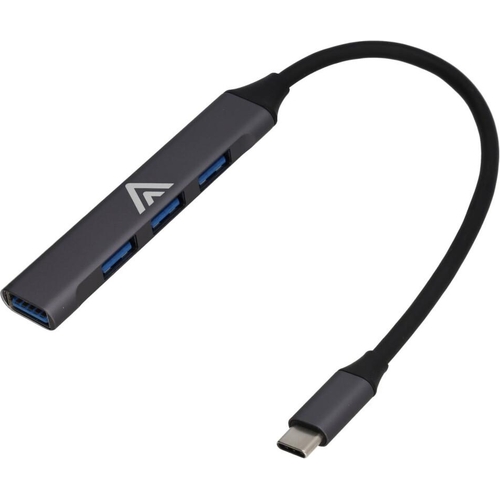
The ultra slim USB HUB allows you to connect up to 4 devices to one USB Type C socket. The USB 3.0...The ultra slim USB HUB allows you to connect up to 4 devices to one USB Type C socket. The USB 3.0 4 port HUB provides 1 x USB 3.0 Superspeed outlet and 3 x USB 2.0 Sockets. The slimline design has an all metal shell and is 7.5mm in height. Features: 4 Port USB hub, 1 x USB 3.0 Socket (Up to 5Gbps Transfer Speed), 3 x USB 2.0 sockets, USB 3.0 Type C Plug (15cm Cable), Low power consumption (USB Powered), Ultra slim design 7.5mm in Height, Plug & Play, hot-swappable, No driver required, Supports the latest Windows operating systems, Supports MAC OSX 10.x and above, Supports Linux.
This Kenable USB hub is for users with Type-C enabled devices who need to expand their connectivity by adding up to four USB devices. Its key benefit is providing a compact and versatile solution for connecting peripherals like keyboards, mice, or external drives. A potential caveat is that the USB 3.0 port has higher transfer speeds, while the other three are USB 2.0, which may limit simultaneous high-speed data transfers. The hub offers a total of four ports: one USB 3.0 for faster data transfer and three USB 2.0 ports, all managed through a single USB Type-C plug with an integrated 15cm cable. It features an ultra-slim, all-metal design for durability and portability, and operates via USB power with low consumption. The hub is Plug & Play, hot-swappable, and requires no drivers for Windows, macOS, or Linux.
All features
Model Part Number
011804
Brand
kenable
Extended Product Information
FAQs
Does this hub require a power adapter?
No, this hub is USB-powered and does not require an external power adapter. It draws power directly from the USB Type-C port it is connected to.
Can I use all four ports for high-speed data transfer?
No, only the single USB 3.0 port supports SuperSpeed (up to 5Gbps) transfer rates. The other three ports are USB 2.0, with speeds up to 480Mbps.
Is this hub compatible with my MacBook Pro?
Yes, this hub is compatible with macOS 10.x and above, including MacBook Pro models that have a USB Type-C port.
What is the transfer speed of the USB 3.0 port?
The USB 3.0 port on this hub supports SuperSpeed transfer rates of up to 5Gbps.
Do I need to install any drivers?
No, this hub is Plug & Play and does not require any drivers to be installed. It is designed to work automatically with Windows, macOS, and Linux.
Can I use this hub to charge my phone?
While you can connect a phone to charge, this hub is primarily designed for data transfer and peripheral connectivity. It may not provide the fastest charging speeds for smartphones or tablets, as it relies on USB power delivery.
What is the length of the integrated cable?
The integrated USB Type-C cable is 15cm long.
Troubleshooting
Device not recognized after plugging in
Ensure the USB Type-C connector is fully inserted into the computer's port. Try plugging the hub into a different USB Type-C port if available. Restart your computer and try again.
Slow data transfer speeds
Verify that you are using the USB 3.0 port (the one with the blue interior or designated for higher speeds) for devices requiring high transfer rates. Ensure the connected device and the computer's port both support USB 3.0 speeds.
Intermittent connection or device drops
Check the connection of the integrated USB Type-C cable. Ensure that connected devices are not drawing excessive power. If using multiple high-power devices, ensure your computer can supply enough power, or consider a powered USB hub.
Hub not working with a specific device
Test the device with a direct connection to the computer if possible. Try connecting the device to a different port on the hub. Ensure the device's drivers are up to date.
Pros and Cons
Pros
Adds four USB ports to a single Type-C connection.
Includes one high-speed USB 3.0 port for faster data transfers.
Slim and durable all-metal construction.
Requires no external power adapter, making it portable.
Plug and Play functionality for easy setup on most operating systems.
Compact size makes it ideal for travel or minimalist desk setups.
Cons
Only one port is USB 3.0; the remaining three are USB 2.0.
The integrated cable has a fixed length of 15cm, which may be too short for some setups.
Does not support high-power charging for connected devices.
All-metal construction can be susceptible to scratches if not handled carefully.
Setup, Compatibility & Care
Setup:
Connect the integrated USB Type-C plug to an available USB Type-C port on your computer or laptop.
The hub is Plug & Play, so it should be automatically detected by your operating system.
Connect your USB devices (keyboard, mouse, flash drive, etc.) to the available ports on the hub.
Compatibility:
Operating Systems: Supports Windows (latest versions), macOS 10.x and above, and Linux.
Device Types: Compatible with standard USB peripherals. Note that the USB 3.0 port offers the highest speeds, while USB 2.0 ports are suitable for less demanding devices. High-power devices may not perform optimally without external power.
Care:
Keep the hub clean by wiping it with a dry or slightly damp soft cloth. Avoid using harsh chemicals or abrasive cleaners.
Protect the metal casing from scratches by handling it with care.
Ensure the USB ports are free from dust and debris to maintain good connections.

 OnBuy.com£5.99Visit shop
  B&Q£7.29Visit shop