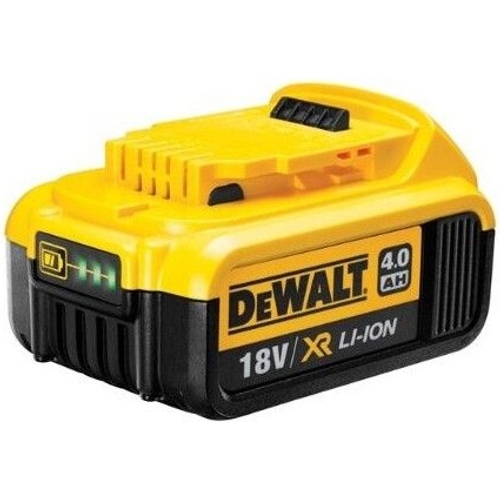
DeWalt XR Battery - 18V - 4Ah - Dcb 182-Xj

The DeWalt 18V XR 4Ah battery is designed for high performance and reliability, providing consiste...

Best current price£49.89from OnBuy.com

All Offers

4 offers from £49.89 - £82.09

View price history by clicking the chart icon.

OnBuy.comDewalt 18V Xr Li-Ion Battery Dcb182-Xj – High-Performance, Easy-Use Power
Free delivery in 1–3 days
£49.89
Visit shop
eBayDeWALT 18V XR Rechargeable Battery 4.0Ah – DCB182-XJ
Free delivery in 1–3 days
£62.99
Visit shop

Product Information

Full details

The DeWalt 18V XR 4Ah battery is an essential power solution for professional contractors and serious DIY enthusiasts who rely on the DeWalt 18V cordless tool ecosystem. It offers a significant boost in runtime compared to standard 2Ah packs, allowing for sustained performance during intensive tasks like heavy drilling or cutting. However, users should note that the higher capacity naturally adds slightly more weight and physical volume to the tool, which may impact handling during overhead operations.

All features

Model Part NumberDcb 182-Xj
BrandDeWalt

Extended Product Information

FAQs

Is this battery compatible with older 18V DeWalt tools?

Yes, this battery is compatible with the vast majority of DeWalt 18V tools, including many older NiCad models if an appropriate adapter is used, though it is optimized specifically for the XR lithium-ion line.

How long does it take to charge this 4Ah battery?

Charging time varies depending on your charger model. Using a standard multi-voltage charger, it typically takes between 60 to 90 minutes to achieve a full charge.

Can I leave this battery on the charger indefinitely?

While modern DeWalt chargers are smart and stop charging when full, it is best practice to remove the battery once fully charged to extend the overall lifespan of the cells.

Does the battery indicate when it is overheating?

The battery itself does not have an alert system, but if your tool cuts out during use, it is a sign that the battery or tool has reached its thermal limit.

Can I use this battery in freezing temperatures?

Lithium-ion batteries will perform less efficiently in cold weather. For best results, store the battery in a warm environment before use in freezing conditions.

Troubleshooting

Battery will not charge and the charger light does not illuminate.

Ensure the battery is firmly clicked into the charger. Check that the charger is plugged into a functioning power outlet and the terminals are clean.

Tool loses power unexpectedly under load.

This may trigger the tool's thermal overload protection. Remove the battery, let both the tool and the battery cool for several minutes, and verify the charge level via the LED gauge.

The LED charge indicator does not turn on.

Check for debris obstructing the button or lens. If the battery still functions but the light remains off, the light module may be faulty, though the battery remains usable.

Pros and Cons

Pros

  • Significantly longer runtime for power-hungry tools
  • Compatible with the entire DeWalt 18V XR cordless range
  • Durable housing built for rugged job site environments
  • Convenient LED battery level indicator
  • Zero memory effect for consistent performance over time

Cons

  • Increased weight compared to 2Ah or 3Ah slim-pack models
  • Larger physical footprint may limit access in tight spaces
  • Longer charging time required compared to smaller capacity batteries

Setup, Compatibility & Care

The DeWalt XR 18V 4Ah battery is fully compatible with all tools in the DeWalt 18V XR cordless range. To ensure longevity, follow these care guidelines:

  1. Charging: Always use a compatible DeWalt XR charger. Avoid using third-party chargers that may not regulate heat effectively.
  2. Temperature Management: Allow the battery to cool down for 10-15 minutes after heavy use before placing it on a charger, as heat is the primary enemy of lithium-ion cells.
  3. Storage: Store in a cool, dry place. Avoid leaving the battery exposed to extreme temperatures, such as inside a hot vehicle during summer.
  4. Routine Cleaning: Keep the contact terminals free of dust and metal debris using a dry cloth or compressed air to ensure a clean electrical connection.

Price History

DatePrice
Visit shop