DeWALT Impact Torsion Screwdriver Bit - T20 x 57mm - Magnetic Screwlock Sleeve - DeWalt
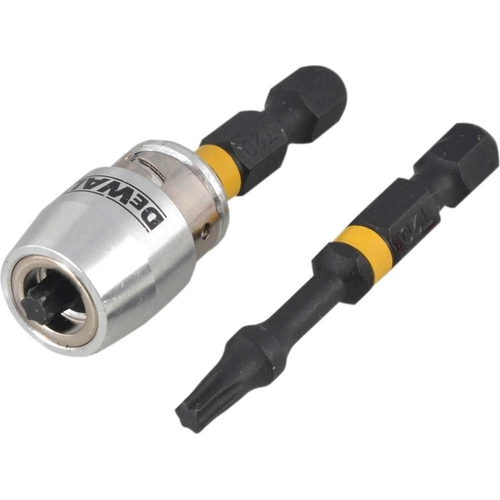
Introducing the DEWALT DT70537T FLEX TORQ Impact Torsion screwdriver bits. This set includes two 5...Introducing the DEWALT DT70537T FLEX TORQ Impact Torsion screwdriver bits. This set includes two 57mm T20 Torx screwdriver bits and a Magnetic Screwlock Sleeve. The 15-degree torsion zone allows the screwdriver bit to flex rather than breaking, while the Full Fit head prevents the rounding of the screw head and 'cam out' (bit head slipping out of screw head due to the turning force). The Magnetic Screwlock enables tasks to be completed quicker and easier, reducing instances of dropped or lost screws.
This guide is for anyone using the DeWALT DT70537T-QZ Impact Torsion Screwdriver Bit. It helps users understand the features, setup, and maintenance of these bits. The key benefit is enhanced durability and efficiency when driving screws, thanks to the torsion zone and magnetic screwlock sleeve. Note that these bits are designed for impact drivers and may not perform optimally with standard drills.
All features
Model Part Number
DT70537T-QZ
Brand
DeWalt
Extended Product Information
FAQs
What is the purpose of the torsion zone?
The torsion zone absorbs the impact force, reducing stress on the bit and screw, which extends the bit's life and reduces screw head damage.
What type of screws are these bits designed for?
These bits are specifically designed for T20 Torx screws.
Can I use these bits with a regular drill?
While you can technically use them, the bits are designed for impact drivers, and performance may not be optimal with a standard drill.
How do I maintain the magnetic screwlock sleeve?
Clean the sleeve of any metal shavings or debris. Replace the sleeve if it loses its magnetic strength.
What should I do if the bit starts to round out the screw head?
Stop immediately, check the bit's condition, and ensure you're using the correct size. Replace the bit if it's worn.
Are replacement screwlock sleeves available?
Yes, replacement magnetic screwlock sleeves are typically available from DeWALT or tool retailers.
How do I know when to replace the bit?
Replace the bit when the head shows signs of wear, the edges are rounded, or it no longer fits snugly in the screw head.
Troubleshooting
Bit slipping out of the screw head.
Ensure you are using the correct size bit and applying sufficient pressure. Check for wear on the bit and replace if necessary.
Bit breaking prematurely.
Reduce the driving speed or force. Check the screw type and material to ensure the bit is suitable. Inspect for excessive wear.
Magnetic screwlock sleeve not holding screws.
Clean the sleeve of any debris. Check for magnetic degradation and replace the sleeve if necessary.
Pros and Cons
Pros
Increased bit life due to the torsion zone.
Reduced screw head damage from the Full Fit head.
Faster work due to the magnetic screwlock sleeve.
Improved grip and reduced cam-out.
Cons
Only compatible with impact drivers.
May require replacement of the magnetic sleeve over time.
Specific to T20 Torx screws.
Setup, Compatibility & Care
Compatibility: These bits are designed for use with impact drivers. Ensure your driver has a standard 1/4" hex chuck.
Installation: Insert the bit into the impact driver's chuck. The magnetic screwlock sleeve may slide onto the bit before or after insertion, depending on the design.
Use: Place the screw onto the bit and align with the screw hole. Apply firm, steady pressure while driving the screw. The torsion zone will flex, absorbing the impact.
Care:
Inspect bits regularly for wear or damage.
Clean the bits after each use to remove debris.
Store the bits in a dry place to prevent rust.
Replace bits when the head shows signs of wear to maintain performance.


 eBay£6.89Visit shop
  B&Q£11.87Visit shop


