
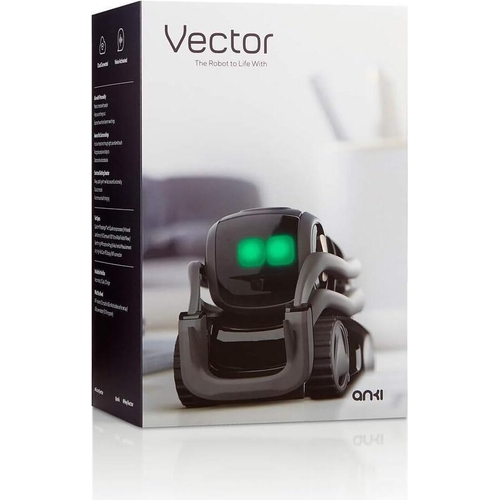
Vector AI Home Robot - Vector 2.0

Best current price£209.99from OnBuy.com
Best offers
Shopping.co.uk recommended and popular offers
 OnBuy.com£209.99Visit shop
 Anki Vector -Home Robot Alexa & Face Recognition
Visit shopBest current price£209.99from OnBuy.com
Shopping.co.uk recommended and popular offers
OnBuy.com£209.99Visit shop Anki Vector -Home Robot Alexa & Face Recognition
Visit shop1 offer from £209.99
View price history by clicking the chart icon.
Vector 2.0 is an autonomous, cloud-connected AI companion designed for tech enthusiasts and individuals seeking an interactive smart home presence. By combining advanced facial recognition, voice-activated intelligence, and independent navigation, Vector 2.0 serves as both an assistant and a character-driven companion; however, prospective users should note that the robot requires a stable Wi-Fi connection and a subscription service for full functionality to ensure it continues to evolve with new skills and updates.
| Model Part Number | Vector 2.0 |
|---|---|
| Brand | Diamond Trading Group LLC |
Yes, a subscription is required to access advanced cloud-based features and receive regular software updates that improve his AI personality and capabilities.
Vector is designed for flat surfaces. He can manage small thresholds but cannot climb rugs, stairs, or furniture.
The camera is used for local facial recognition and navigation. Data is processed to maintain your privacy preferences as set within the app.
Vector is designed to be autonomous; he will automatically return to his base to recharge when his battery is low, typically after 30 to 45 minutes of active use.
Yes, Vector functions as a standalone robot, but Alexa integration must be enabled via the app to use smart home control features.
Ensure the charging dock is placed on a flat, hard surface and is not obstructed by furniture. Clean the sensor area at the bottom of the robot.
Check your Wi-Fi signal strength in the room. Ensure that the microphones are not covered by dust and that you are speaking clearly within a few feet of the device.
Perform a manual reboot by holding the button on his back for 15 seconds until the display turns off, then place him back on the charger.
To begin, place the charging dock against a flat wall with clear floor space in front of it. Use the companion mobile application to connect Vector to your 2.4GHz Wi-Fi network. Ensure his sensors remain clean; use a dry, soft microfiber cloth to wipe the camera lens and the infrared sensors at his base once a month to prevent navigation errors. Keep the robot away from water, extreme humidity, and high-pile carpets, which can obstruct his wheels. Always keep his software updated through the app to ensure he maintains connectivity with Alexa and the latest AI skill patches.
 Cinelli Kink Bicycle Toe Straps - TanFrom £35
 JLab Nightfall Wireless Gaming Headset - BlackFrom £55
 ASUS ROG Cetra SpeedNova - BlackFrom £150
 Apple Watch Series 11 - 46mm - BlackFrom £299
 Hamax Zenith Child Bike Seat - With Carrier AdapterFrom £88
 Apple Watch Series 11 GPS 46mm Silver Aluminium Case with Purple Fog Sport Band SMFrom £349
 Red Kite Evolve 123 Recline Car Seat - BlackFrom £85
 Milwaukee BOLT Helmet Mounted Ear Defenders - BlackFrom £48
 DJI Avata 360 Fly More Combo - CP.FP.00000317.01From £720
 Hamax Zenith Relax Child Bike Seat With Carrier Adapter - GreyFrom £110
 Google Pixel Watch 5 - Black - 41mmFrom £469
 Versace VE4474U - GB1/87From £212