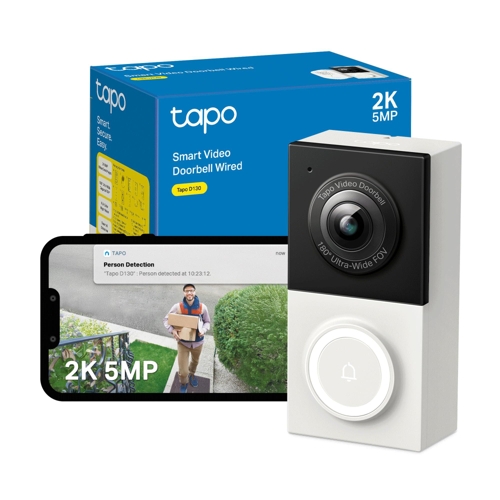
TP-Link Tapo D130 Smart Wired Video Doorbell - Black
See who's at your front door - and answer it from anywhere - with this TP-Link smart doorbell. The...See who's at your front door - and answer it from anywhere - with this TP-Link smart doorbell. The 2K resolution video with a 180° viewing angle lets you easily see what's going on. And with colour night vision, you'll get a clear image when it gets dark. Plus, AI detection can tell the difference between a person, car, or a pet, and only sends you notifications that matter. The doorbell features two-way audio for remote conversations and quick responses for pre-recorded messages. Tapo Care offers cloud storage for footage (subscription required), while a local microSD card provides storage without a subscription. It integrates with Alexa and Google for smart display control and has an IP65 rating for weather resistance. The doorbell also includes an indoor chime with various ringtones and activity zones for customized monitoring.
The TP-Link Tapo D130 Smart Wired Video Doorbell is designed for homeowners seeking enhanced security and convenience at their doorstep. Its key benefit is providing a clear, wide-angle view of visitors and the surrounding area, day or night, with intelligent motion detection alerts. A potential caveat is the need for existing wired doorbell infrastructure for installation.
All features
Colour
Black
Model Part Number
Tapo D130
Brand
TP-Link
Extended Product Information
FAQs
Do I need a subscription for cloud storage?
No, a microSD card (up to 512 GB) can be used for local storage without a subscription. Tapo Care cloud storage is optional and offers additional features like richer notifications and a 30-day video history.
What is the maximum size MicroSD card supported?
The doorbell supports MicroSD cards up to 512 GB.
Can I install this doorbell if I don't have existing doorbell wiring?
This is a wired video doorbell and requires existing doorbell wiring for power. It is not battery-powered.
How do I adjust the viewing angle?
The doorbell comes with mounting wedges. You can use these during installation to tilt the doorbell up or down, allowing you to customize the field of view, for example, to better see packages on the ground.
Is the doorbell suitable for all weather conditions?
Yes, the Tapo D130 has an IP65 rating, making it weatherproof and resistant to dust and rain. However, extreme temperatures or direct prolonged submersion should be avoided.
What smart home platforms does it integrate with?
The doorbell integrates with Amazon Alexa and Google Assistant, allowing for voice control and integration with smart displays.
How does the AI detection work?
The AI analyzes motion events to differentiate between people, vehicles, pets, and general motion. You can configure it to send notifications only for specific categories, reducing unwanted alerts.
Troubleshooting
Doorbell not powering on
Verify that the circuit breaker is switched on. Ensure the wiring is securely connected to the doorbell terminals and check that your existing doorbell transformer provides sufficient voltage (typically 8-24V AC).
Cannot connect to Wi-Fi
Confirm you are connecting to a 2.4 GHz Wi-Fi network, not 5 GHz. Ensure the Wi-Fi password is entered correctly and that the doorbell is within range of your router. Restart your router and the doorbell.
Poor video quality or lag
Check your internet connection speed. Ensure the doorbell is not too far from your Wi-Fi router. Consider upgrading your router or using a Wi-Fi extender if signal strength is weak.
Motion alerts are too frequent or not triggered
Adjust the Activity Zones within the Tapo app to focus on important areas. Fine-tune the Motion Detection Sensitivity settings. Ensure AI detection is enabled and configured for the types of alerts you want.
Audio is not working
Check that the microphone and speaker are not muted in the Tapo app. Ensure the app has permission to access the microphone on your smartphone. Test the audio using both two-way talk and quick responses.
Pros and Cons
Pros
Exceptional 2K 5MP resolution for clear video.
Wide 180° field of view captures more detail.
Color night vision enhances visibility after dark.
Intelligent AI detection reduces false alarms.
Flexible storage options (local microSD or cloud).
Durable IP65 weatherproof rating.
Cons
Requires existing wired doorbell connections for power.
Advanced cloud features require a Tapo Care subscription.
MicroSD card not included.
Initial setup may require some technical knowledge for wiring.
Setup, Compatibility & Care
Setup:
Power: Ensure you have existing wired doorbell wiring. Disconnect power to your existing doorbell at the circuit breaker before installation.
Mounting: Mount the doorbell using the provided hardware. Use the included wedges if needed to adjust the viewing angle.
Wiring: Connect the doorbell wires to the terminals on the Tapo D130 according to the included manual.
Chime: Connect the indoor chime to a power outlet and pair it with the doorbell following the app instructions.
App Configuration: Download the Tapo app, create an account, and follow the in-app guide to connect the doorbell to your Wi-Fi network.
Compatibility:
Wi-Fi: Requires a 2.4 GHz Wi-Fi network.
Smart Home: Compatible with Amazon Alexa and Google Assistant for voice control and smart display integration.
Memory Card: Supports MicroSD cards (TransFlash) up to 512 GB.
Care:
Cleaning: Clean the exterior of the doorbell with a soft, damp cloth. Avoid using abrasive cleaners.
Maintenance: Periodically check the lens for dust or obstructions. Ensure the wiring connections remain secure and free from corrosion.



 Tapo by TP-Link£57.99Visit shop
  Currys£74.99Visit shop


