
Tamron 35-100mm f/2.8 Di III VXD Full-Frame Zoom Lens - Nikon Z
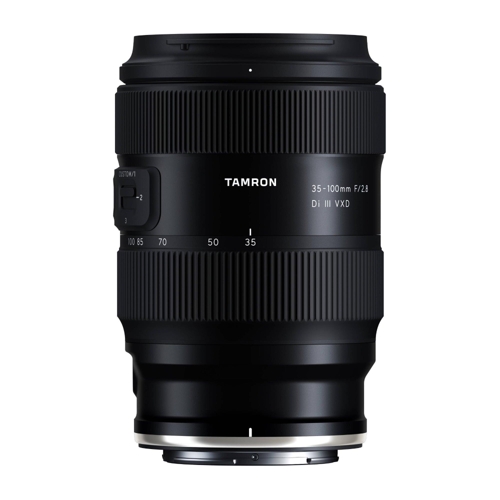
Designed to deliver professional image quality in a compact and lightweight body, this 35-100mm zo...Designed to deliver professional image quality in a compact and lightweight body, this 35-100mm zoom maintains a bright f/2.8 aperture across the entire zoom range for consistent exposure and beautiful background separation. The lens utilizes Tamron’s VXD linear motor for fast, accurate, and ultra-quiet autofocus performance. Its optical construction includes specialized glass elements to minimize chromatic aberrations and enhance clarity, while the rounded 9-blade diaphragm produces smooth, pleasing bokeh. Built for real-world shooting conditions, the lens features moisture-resistant construction, a fluorine-coated front element, and a zoom lock switch for secure transport. With a close focusing distance of 8.7 inches at the wide end and 0.3x magnification, it also allows for impressive close-up shots. The integrated USB-C connector port supports Tamron Lens Utility for lens customization and firmware updates. Full-Frame Coverage (35-100mm) Provides a versatile wide-angle to short telephoto range, perfect for portraits, street photography, events, and travel. Constant f/2.8 Aperture Maintains consistent brightness throughout the zoom range for low-light performance and smooth background blur. VXD Linear Motor Autofocus Delivers fast, precise, and ultra-quiet autofocus, ideal for both photography and video recording. Advanced Optical Construction (15 Elements in 13 Groups) Incorporates aspherical, LD, and XLD elements to reduce aberrations and ensure sharp, high-contrast images. 9-Blade Rounded Diaphragm Creates soft, natural bokeh for enhanced subject separation and flattering portrait results. Minimum Focus Distance: 8.7 inches to 25.6 inches Allows close-up shooting with up to 0.3x magnification for detailed subject capture. Tamron Lens Utility Compatibility USB-C connector port enables customization of autofocus settings and firmware updates. Moisture-Resistant Design and Fluorine Coating Protects against dust and splashes while repelling water and fingerprints from the front element. BBAR-G2 Coating Reduces flare and ghosting while improving contrast and clarity, even in backlit conditions. Zoom Lock Switch Prevents unwanted barrel extension during transport. Lightweight and Compact Design (1.3 lb / 575 g) Portable and comfortable for extended handheld shooting sessions. 67mm Filter Thread Compatible with a wide range of front lens filters and accessories. The 35-150mm F/2-2.8 Di III VXD (Model A058), launched in 2021, has earned strong praise as a high-end portrait zoom. While highly acclaimed for its imaging performance, some users have wished for a lighter, more compact option. Developed in response to user demand, the 35-100mm F/2.8 Di III VXD (Model A078) focuses on the most essential and popular portrait focal lengths - 35mm, 50mm, 85mm and 100mm - in one lens. Despite its fast F2.8 aperture, it achieves a remarkably compact and lightweight design at just 4.7" (119.2mm) and 19.9oz. (565g). Delivering high image quality and soft bokeh, it’s perfect for candid portraits and travel photography. The VXD (Voice-coil eXtreme-torque Drive) linear motor provides fast, precise AF to capture natural expressions, and the 8.7" (0.22m) MOD at the wide end is ideal for tabletop shots. The TAMRON Lens Utility™ allows users to assign functions for video and stills, while the refined design ensures comfortable handling for everyday and special moments. The lens is compatible with TLU Version 5.0 and new TAMRON-LINK bluetooth adapter for wireless connectivity.
Best current price£699.99from OnBuy.com
Best offers
Shopping.co.uk recommended and popular offers
 OnBuy.com£699.99Visit shop ›
Tamron 35-100 F2.8 Di Iii Vxd (Nikon Z) 725211780021
Visit shop ›


